 Bank Zenit
 Renaissance Bank
 LOCO-Bank
 T-Bank
 Bank Sinara
 Credit Europe Bank



Дебетовая карта Black от Т-Банка


 Loading...


Articles about debit cards

About the card
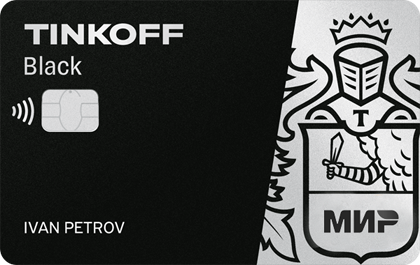
“Т-Банк Блэк” от Т-Банка можно назвать одной из лучших дебетовых карт 2023 года. По ней банк предлагает действительно выгодные условия обслуживания: отсутствие ежемесячной платы при соблюдении простых условий, большие лимиты на снятие наличных и переводы денег без комиссии, неплохой кэшбэк за покупки и процент на остаток по карточке.
Terms
The issuance of primary and additional cards, as well as their reissue and courier delivery to your home or office, are completely free. The annual maintenance fee is 99 RUB per month. However, it can be free if you meet one of the following conditions:
- maintain a minimum balance across card, savings, investment accounts, and deposits of at least 50,000 RUB per month;
- имеете кредит в Т-Банке Банке, выданный на этот карточный счет;
- имеете активную подписку “Т-Банк Pro”.
Дополнительно вы можете подключить уведомления об операциях. Стоимость этой услуги составляет 59 рублей в месяц с абонентским номером “Т-Мобайл” и 99 рублей в месяц без него.
You can use the mobile app and online banking free of charge. The bank also charges no fees for notifications regarding card issuance, top-ups, activation, blocking, or for transactions made via online banking and the mobile app.
Бесплатно пополнять карту вы можете в собственных банкоматах Т-Банк Банка, а также переводом из другого банка любым из предложенных ниже способов:
- by card number;
- by phone number via the Faster Payments System;
- via bank account details.
You can also top up your card for free at partner bank ATMs, provided the transaction amount does not exceed 150,000 RUB per month. Otherwise, you will need to pay a 2% commission.
Бесплатно снимать наличные вы можете так же в собственных банкоматах Т-Банк Банка на сумму до 500 тысяч рублей в месяц. За превышение этого лимита вам потребуется заплатить комиссию в размере 2%, но не менее 90 рублей. Кроме этого, бесплатно снимать наличные вы можете в банкоматах других банков, если соблюдаете следующие условия:
- you withdraw at least 3,000 RUB per transaction;
- you withdraw no more than 100,000 RUB per month.
In other cases, you will need to pay a 2% fee, but not less than 90 RUB.
Бесплатно переводить деньги вы можете между собственными счетами в Т-Банке, а также другим клиентам банка. Осуществлять переводы в другие кредитные организации без комиссии вы можете по номеру телефона через Систему быстрых платежей на сумму до 5 миллионов рублей в месяц.
Кроме этого, бесплатно переводить деньги клиентам других банков вы можете по номеру карты на сумму до 50 тысяч рублей в месяц с активной подпиской “Т-Банк Pro” и до 20 тысяч рублей в месяц без нее. За превышение этого лимита вам потребуется заплатить комиссию в размере 1,5%, но не менее 30 рублей.
Как и другие банки, Т-Банк поощряет своих клиентов за использование дебетовой карты и начисляет кэшбэк за покупки. Так, вы можете получать:
- from 1% to 15% of the spent amount for purchases in selected categories;
- до 30% — за покупки по спецпредложениям Т-Банк Банка.
Максимальная сумма кэшбэка за покупки в выбранных категориях составляет 5 тысяч бонусных рублей с активной подпиской “Т-Банк Pro” и 3 тысячи бонусных рублей в месяц без нее. За покупки по спецпредложениям банк начисляет не более 6 тысяч бонусных рублей в месяц. Кэшбэк поступает на карту в виде живых рублей, поэтому тратить его вы можете по своему усмотрению.
Вы можете получать 5% годовых на остаток до 300 тысяч рублей при условии совершения покупок на сумму от 3 тысяч рублей в месяц и наличия активной подписки “Т-Банк Pro”, “Т-Банк Premium” или “Т-Банк Private”.
Pros:
- free issuance of primary and additional cards, as well as their reissue;
- free courier delivery of the card to your home;
- free card maintenance subject to the terms of the agreement;
- free use of the mobile app and online banking;
- бесплатное пополнение карты в банкоматах Т-Банк, переводом из других банков и в устройствах партнеров;
- бесплатное снятие наличных в банкоматах Т-Банк и устройствах других банков;
- бесплатные переводы внутри Т-Банк и клиентам других банков по номеру телефона через Систему быстрых платежей и по номеру карты;
- cashback accrual of up to 30% of the purchase amount;
- cashback credited in actual rubles;
- up to 5% per annum on the card balance.
Cons:
- paid annual maintenance if agreement terms are violated;
- high fees for top-ups, cash withdrawals, and transfers when limits are exceeded.
How to apply
У Т-Банк Банка нет физических офисов, поэтому подать заявку на оформление дебетовой карты вы можете только онлайн — на официальном сайте или в мобильном приложении. Для этого вам нужно:
- перейти на сайт Т-Банк Банка;
- click the "Apply for card" button;
- provide your full name, mobile phone number, email address, date of birth, and citizenship;
- provide your nickname and promo code, if you have one;
- click the "Apply" button;
- enter the confirmation code from the SMS message;
- provide the full delivery address, date, and time of the meeting with the courier;
- click the "Order Delivery" button.
После того как вы заполните заявку, с вами свяжется сотрудник Т-Банк Банка для того, чтобы согласовать место, дату и время встречи с курьером. В назначенный день вам останется только подписать договор на обслуживание карты и активировать карточку в мобильном приложении.
Rates
at third-party bank ATMs for amounts from 3,000 RUB per transaction and up to 100,000 RUB per month — free of charge;
at third-party bank ATMs in other cases — 2%, but not less than 90 RUB
другим клиентам Т-Банк Банка — бесплатно;
to clients of other banks by phone number via the Faster Payments System — free of charge;
to clients of other banks by card number for amounts up to 20,000 RUB per month — free of charge;
to clients of other banks by card number in other cases — 1.5%, but not less than 30 RUB;
Calculator
Answers to questions
My application was approved, who will deliver the card to me?
If there is a courier service in your region, the bank's courier will deliver the card. In other cases, delivery is carried out via Russian Post.
I got the card, how do I activate it?
There are two activation options:
First – download the mobile app and follow the instructions.
Second – go to the company's website via PC and follow the specified instructions.
How can I check my card account?
There are three options:
First. Check the account in the mobile app.
Second. Visit the official website and check via your Personal Account.
Third. Order a statement at any ATM in the country.
I have a child, how can I get a card for them?
Yes, you can issue a card for your child under the Junior program; your details and the child's details will be required.














Customer reviews
Leave a review