 Bank Zenit
 Renaissance Bank
 LOCO-Bank
 T-Bank
 Bank Sinara
 Credit Europe Bank



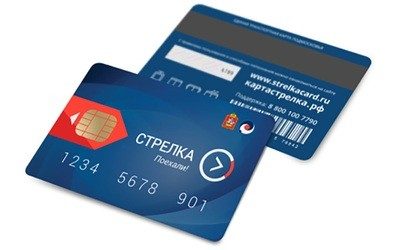
Check Strelka card balance

What is the Strelka ETK balance
Card balance is the remaining funds on it as of a specific date. Before starting to use Strelka, you need to deposit money into the account. Please note that some payment methods (for example, using a mobile phone account with Beeline or MTS operators) incur a fee. For every trip using the ETK, money is automatically deducted from it. The difference between deposits and deductions is the card balance, which needs to be monitored.
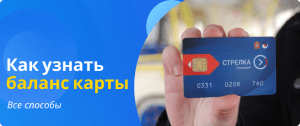
Where to find the transport card number
Just like with bank cards, Strelka's number is indicated on the front side under the chip and logo. It consists of 11 digits and most often starts with the combinations "0331", "0332", or "0333".
We will find offers tailored to your situation
Leave your phone number, and we will show you options with a high approval probability and current terms.
- Verified offers
- No calls from managers
- Results delivered through your preferred channel
How to check the Strelka balance by card number
The number of partners of the Moscow Region ETK is growing, and the number of ways to check the balance of the electronic payment instrument is also increasing. The current list is published on the official project website https://strelkacard.ru, today you can check how much money is on the card using the following methods.
Using the official website
On the main page of the official "Strelka" portal https://strelkacard.ru there is a field "Enter card number". You need to enter your transport card details there and click "Check balance". This will allow you to instantly check the money on the card without registering on the site. To avoid having to enter data every time, you can register and check via your personal account. Then checking the balance will become much easier — the browser will remember the login and password for entry, and in the future, it will be enough to refresh the page to get up-to-date information.
Through the mobile app
The "Strelka Card" app is available in the iOS, Android, and Windows Phone application stores. By downloading it and registering, you can monitor the travel card balance in literally two clicks. Right there, you can top up the account without commission, check tariffs, view transaction history, and contact support for help.
By hotline phone
3 months after the ETK project was launched, a hotline for card service issues was created. Since 2015, you can find out the remaining balance by phone number 8-800-100-77-90. The call center operator will clarify the payment instrument number, after which they will report the account balance and answer all questions the client is interested in.
Other methods
Megafon subscribers can check their balance for free by calling 05001045 or using the command *145# card number # (example: *145#12345678910#). After that, the subscriber will receive a voice message with information about the card status or see it on the phone screen.
A passenger can also check the balance and top up "Strelka" in CyberPlat® and QIWI terminals, Sberbank self-service devices and via the "Sberbank Online" service, via the built-in showcase in WebMoney Keeper, including mobile applications, on the website telepay.wmtransfer.com.
In the user's personal account, you can enable SMS notifications for the card. Then for each transaction, whether it is a withdrawal or a top-up, a notification will be sent to the phone. This will make monitoring transport expenses much easier. The cost of the service is 60 RUB per month.
How to top up the Strelka card balance
There are several ways to top up the transport card balance: via your mobile operator, from an e-wallet account, from a bank card, and at ticket offices. Let's look at each method in a bit more detail.
Via mobile operator
To top up the card via your mobile operator, send a message with the text "123456789 50" to the number 7878, where "123456789" is the "Strelka" number, and 50 is the transfer amount. This can also be done on the mobile operator's website in the "Payment from account" section.
From an electronic payment account
You can deposit money onto the card from a YuMoney wallet, QIWI wallet, WebMoney, and Elecsnet. In all cases, you need to go to the payments and transfers section and select the "Transport" tab, find the "Strelka" section in it, indicate the card number and top-up amount, and confirm the payment.
From a bank card account
You can top up your account with a bank card:
- on the official Strelka website and in its mobile app;
- via online banking or a mobile app;
- via payment terminals.
At ticket offices
To top up your card, you will need to contact the ticket offices and bus stations of Mostransavto SES.
The Strelka transport card allows you to use loyalty programs and the current discount system, save time on buying a monthly travel pass, and track your transport expenses more efficiently. Everything is designed for the convenience of public transport passengers; their task is to monitor the card balance and top it up in a timely manner.
0% for 10 years
From 0 %
Limit - up to 500000 RUB
Период - 0 дней
Withdrawal with 0% fee up to RUB 0
Up to 0 %
Тип кешбэка - Рубли
Кешбэк - Нет
Withdrawal without fee up to 100,000 RUB
Up to 0 %
Тип кешбэка - Рубли
Кешбэк - 10%
Other posts