Bank Zenit
 Renaissance Bank
 LOCO-Bank
 T-Bank
 Bank Sinara
 Credit Europe Bank





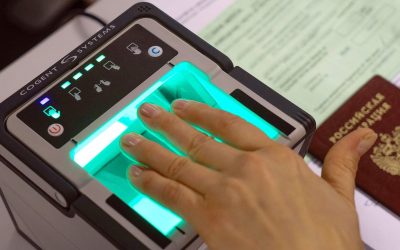
How to opt out of biometrics at Sberbank

What is biometrics at Sberbank?
Biometrics is a method of recognizing a person based on their individual set of physical characteristics. This is how we recognize people we know. And this is exactly how the system identifies users. Banks typically use the following parameters for biometric analysis:
- voice recording;
- facial scan;
- fingerprint.
It is virtually impossible to forge them, and the recognition accuracy is almost 100%. Even if you change your hairstyle or grow a beard, or if your voice becomes hoarse, remote biometric identification will accurately identify your identity. It is only recommended to retake your biometrics if you have undergone plastic surgery on your face.
The official Sberbank website contains a warning about the use of the technology by twins – this is perhaps the only situation in which even the most accurate programs can be tricked and access to confidential information about another person can be obtained.
Since 2018, the Unified Biometric System (UBS), a joint project of the Bank of Russia and Rostelecom, has been collecting biometric data of citizens of the Russian Federation. The largest database in our country allows such data to be used in the financial, healthcare, education, retail, online trading, and government sectors for expedited service.
How does Sberbank collect and use customer biometric data?
Clients use fingerprints to log into the Sberbank mobile app, eliminating the need to enter a five-digit security code. To do this, your smartphone must be equipped with a compatible scanner. When installing the mobile app and logging in for the first time, you must enter your username and password, after which you will be prompted to set up Touch ID. To do this, you will need to place your finger on the scanner several times. This will allow you to log into your personal account using a single fingerprint in a matter of seconds. If you did not use this service when installing the app, you can activate it at any time in the "Settings", "Security", "Login", and "Fingerprint Login" sections.
To set up facial and/or voice identification, it is also not necessary to visit a Sberbank branch. You can submit your biometrics in one of the following ways:
- In the card settings. To do this, open the Sberbank Online app, select the required card, and go to the "Card Settings" section. Open "Pay with a Glance" in the menu and click "Connect".
- In your personal profile. Open the Sberbank Online app, go to "Profile", then "Facial and Voice Recognition". Next, take a photo of your face or record your voice. After recording your voice, a virtual assistant will contact you.
- At a bank branch. To connect the service, contact a branch employee and ask them to capture your biometric data.
Voice biometrics for clients simplifies and reduces hotline service time. You only need to say a single word, and the operator (or automated answering service) already knows who is calling. There is no need to recall the code word you came up with when applying for a banking product, state your personal data, etc.
Facial recognition allows you to pay for purchases with a single glance. This service is already available in select stores, cafes, ATMs, and on Sberbank partner websites. You only need to select in advance in your personal account which card the funds will be debited from.
We will find offers tailored to your situation
Leave your phone number, and we will show you options with a high approval probability and current terms.
- Verified offers
- No calls from managers
- Results delivered through your preferred channel
How to opt out of biometrics at Sberbank?
Currently, by law, the use of biometric technology is a client's right, not an obligation. At the start of your relationship with the bank, you can simply opt out of photo and voice recording. However, if you have already given consent to the processing of such characteristics, you can revoke it only by visiting a Sberbank branch in person. An employee will provide you with an application form. From the moment of your request, the bank will cease any use of your biometric personal data. Using a fingerprint to log into the mobile app can be disabled in the settings by going to the "Security" and "Login" sections and unchecking "Fingerprint Login".
Client identity identification is a mandatory requirement for bank operations. This is the only way to prevent fraudulent activities against citizens' accounts, so cardholders have a vested interest in using biometrics. However, until it is made mandatory, the client has the right to decide against the bank collecting such data.

0% for 10 years
From 0 %
Limit - up to 500000 RUB
Период - 0 дней

Withdrawal with 0% fee up to RUB 0
Up to 0 %
Тип кешбэка - Рубли
Кешбэк - Нет

Withdrawal without fee up to 100,000 RUB
Up to 0 %
Тип кешбэка - Рубли
Кешбэк - 10%
Other posts